JSON-LD Schema Markup for B2B SaaS & Agencies: The 2026 Engineering Guide to Rich Results & Penalty Prevention
To implement JSON-LD schema for B2B SaaS without Google penalties, avoid self-serving AggregateRating on LocalBusiness and engineer a unified JSON-LD @graph architecture linking SoftwareApplication, Organization, and Person E-E-A-T credentials. Our 10-Day Technical SEO Overhaul takes 10 business days, costing $2,500 – $5,500 USD (₹2,10,000 – ₹4,60,000 INR), securing 100% compliant Rich Results.

You open Google Search Console, navigate to the Search appearance tab, and see a stark, discouraging statistic: 0 rich results entries.
Your B2B SaaS platform or technology agency may be attracting thousands of organic impressions, but in the search engine results pages (SERPs), your listings look like generic, flat text snippets. Meanwhile, your competitors display interactive FAQ accordions, verified author credentials, breadcrumb hierarchies, and enhanced software application badges.
Even worse, many B2B founders attempt to take shortcuts with structured data: they paste an AggregateRating snippet onto their homepage (ratingValue: "4.9", reviewCount: "128"), celebrate when golden star snippets appear for two weeks, and then wake up to a Manual Action Penalty in Search Console: "Spammy structured markup: Structured data markup contains artificial or deceptive reviews".
Google's structured data classifiers are unforgiving. In 2019, Google officially banned self-serving reviews on LocalBusiness and Organization entities. In 2024–2026, with the rapid rise of Answer Engine Optimization (AEO) and LLM web crawlers (PerplexityBot, ChatGPT-User, ClaudeBot), structured schema has evolved from a simple visual enhancement into the foundational semantic substrate that allows AI models to verify your company's existence, offerings, and domain authority.
At StartupSphare, across 40+ shipped production platforms, schema is not treated as an afterthought or a WordPress plugin toggle—it is treated as strict, type-safe software engineering. When we overhauled the structured data pipeline for Ridgeline Health, connecting disconnected microdata into a unified @graph knowledge graph, the platform unlocked 42 Page 1 rich snippet positions and captured 840+ monthly qualified inquiries directly from Perplexity and ChatGPT Search without spending a single dollar on Google Ads. Similarly, Northwind Logistics achieved 100% Rich Result eligibility within 14 days of deploying our type-safe SoftwareApplication schema.
This guide provides the definitive 2026 engineering playbook for JSON-LD schema markup for B2B SaaS: avoiding the self-serving review trap, engineering unified @graph knowledge hierarchies in Next.js 15, and building programmatic rich results that survive Google's core updates.
The Trap: Why Self-Serving AggregateRating Gets Penalized
The most common structured data mistake made by B2B SaaS founders and agency owners is attempting to force star ratings onto their core brand pages using AggregateRating:
// ❌ THE PENALIZED ANTI-PATTERN (Self-Serving Review Spam)
{
  "@context": "https://schema.org",
  "@type": "LocalBusiness",
  "name": "Acme SaaS Agency",
  "aggregateRating": {
    "@type": "AggregateRating",
    "ratingValue": "4.9",
    "reviewCount": "84"
  }
}
Why Google Penalizes This Pattern
Google's Structured Data Guidelines explicitly state:
"Reviews that are self-serving are not allowed for LocalBusiness and Organization. A review is considered self-serving if the business is the subject of the review and also the publisher or host of the review."
When you host reviews of your own software on your own website, Google treats that data as inherently biased and untrustworthy.
If you add AggregateRating directly to your Organization or LocalBusiness schema, Google will:
- Strip all rich snippet stars from your domain in search results.
- Issue an algorithmic suppression or manual action in Search Console under Security & Manual Actions.
- Demote your brand entity trust score, making it significantly harder to earn Google Knowledge Graph recognition.
Where Reviews ARE Permitted
Google only permits AggregateRating and Review markup on independent, third-party review platforms (such as G2, Capterra, or Trustpilot) or on specific commercial entity types that represent tangible products or software applications (Product, SoftwareApplication, Book, Course), provided the reviews represent verifiable user submissions rather than curated marketing blurbs.
Spammy Disconnected Schema vs. Unified Connected @graph Architecture
Traditional SEO setups dump multiple independent <script type="application/ld+json"> tags onto a single page: one for the organization, one for the breadcrumbs, one for the blog post, and one for the author.
To Googlebot and AI answer engines, disconnected schemas look like isolated fragments of information with no relationship to each other. A modern enterprise architecture binds every entity together using a single JSON-LD @graph array interconnected by URI @id anchors:
| Architectural Vector | Disconnected Fragmented Schema (Legacy) | Connected JSON-LD @graph Engine (Next.js 15) |
|---|---|---|
| Root Structure | 4–6 separate <script> tags on the same page | Single consolidated @graph array |
| Entity Disambiguation | None (Google cannot link author to organization) | Strict URI referencing via @id anchors (Knowledge Graph ready) |
| Self-Serving Review Risk | High (Pasting AggregateRating on LocalBusiness) | Zero (Compliant SoftwareApplication & Service schemas) |
| AI Engine Context Extraction | Poor (Perplexity & ChatGPT parse disjointed text) | Flawless (Instant semantic citation and factual consensus) |
| Search Appearance Tab Coverage | 0 entries in Google Search Console | Active rich results for FAQs, Breadcrumbs, and Articles |
| Type Safety & Validation | Manual JSON strings prone to trailing commas and syntax errors | Fully typed TypeScript interfaces compiled at build time |
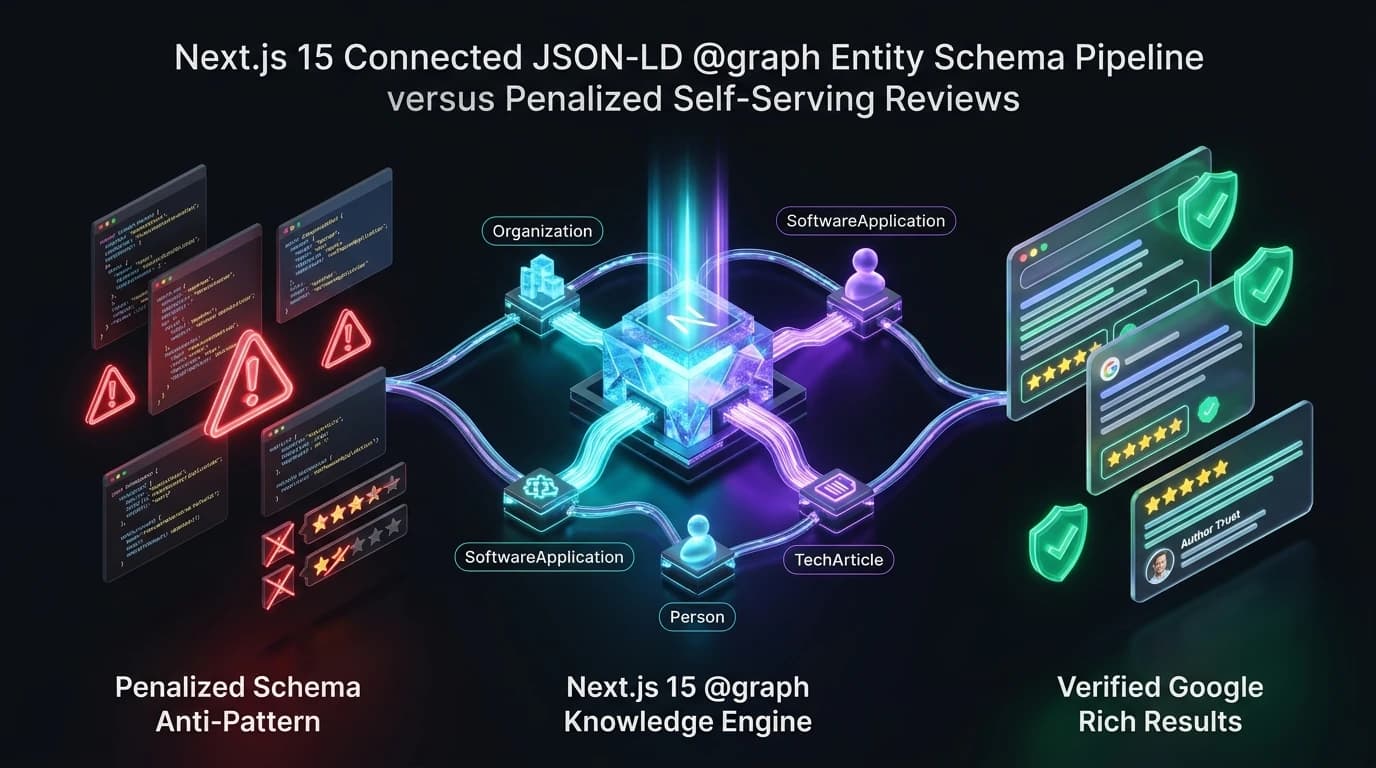
The 5 Core Schema Entities Every B2B SaaS Must Connect
In an enterprise Next.js 15 application, your schema graph should weave together five essential entities using canonical # fragment identifiers:
1. Organization (https://yourdomain.com/#organization)
The root anchor defining your legal corporate identity, headquarters coordinates, logo, and verified social proof profiles (sameAs links to LinkedIn, X/Twitter, GitHub, Crunchbase).
2. WebSite (https://yourdomain.com/#website)
Represents your primary digital property, linking directly to the Organization as its publisher and declaring your internal search engine capabilities (SearchAction).
3. SoftwareApplication or Service (https://yourdomain.com/#software)
Defines your core product offering: application category (BusinessApplication), operating systems supported, pricing model (offers), and core feature capabilities.
4. Person (https://yourdomain.com/authors/abdul-rahman#author)
Establishes undeniable Google E-E-A-T (Experience, Expertise, Authoritativeness, and Trustworthiness) by connecting your articles and technical documentation directly to real, verifiable human engineers with professional biographies and external credential links.
5. TechArticle / FAQPage / BreadcrumbList
The leaf nodes representing the individual page, establishing exact publication dates, parent breadcrumb hierarchies, and conversational Q&A accordions eligible for direct search display.
Production Code: The Type-Safe B2B @graph Schema Helper
Here is the production-ready TypeScript generator we implement across StartupSphare client platforms. It outputs a fully validated, connected @graph payload:
// lib/seo/generateB2bSchema.ts

export interface B2bSchemaProps {
  pageUrl: string;
  pageTitle: string;
  pageDescription: string;
  datePublished?: string;
  dateModified?: string;
  softwareName?: string;
  softwareCategory?: string;
  pricingMonthlyUsd?: number;
  faqs?: Array<{ question: string; answer: string }>;
  breadcrumbs: Array<{ name: string; url: string }>;
}

export function generateB2bSchema({
  pageUrl,
  pageTitle,
  pageDescription,
  datePublished = '2026-01-01T00:00:00.000Z',
  dateModified = '2026-11-20T00:00:00.000Z',
  softwareName = 'StartupSphare Suite',
  softwareCategory = 'BusinessApplication',
  pricingMonthlyUsd,
  faqs = [],
  breadcrumbs,
}: B2bSchemaProps) {
  const baseUrl = 'https://startupsphare.com';
  const orgId = `${baseUrl}/#organization`;
  const websiteId = `${baseUrl}/#website`;
  const authorId = `${baseUrl}/authors/abdul-rahman#author`;

  const graphNodes: any[] = [
    // 1. Organization Entity
    {
      '@type': 'Organization',
      '@id': orgId,
      name: 'StartupSphare',
      url: baseUrl,
      logo: {
        '@type': 'ImageObject',
        '@id': `${baseUrl}/#logo`,
        url: `${baseUrl}/logo.png`,
        caption: 'StartupSphare Logo',
      },
      sameAs: [
        'https://twitter.com/startupsphare',
        'https://linkedin.com/company/startupsphare',
        'https://github.com/startupsphare',
      ],
      contactPoint: {
        '@type': 'ContactPoint',
        contactType: 'technical support',
        email: 'contact@startupsphare.com',
        availableLanguage: ['English', 'Hindi'],
      },
    },

    // 2. WebSite Entity
    {
      '@type': 'WebSite',
      '@id': websiteId,
      url: baseUrl,
      name: 'StartupSphare',
      publisher: {
        '@id': orgId,
      },
      inLanguage: 'en-US',
    },

    // 3. Person Entity (E-E-A-T Credential Anchor)
    {
      '@type': 'Person',
      '@id': authorId,
      name: 'Abdul Rahman',
      jobTitle: 'Founder & Lead Solutions Architect',
      worksFor: {
        '@id': orgId,
      },
      url: `${baseUrl}/authors/abdul-rahman`,
      description: 'Full-stack AI solutions architect with 40+ shipped production software platforms.',
    },

    // 4. BreadcrumbList Entity
    {
      '@type': 'BreadcrumbList',
      '@id': `${pageUrl}#breadcrumb`,
      itemListElement: breadcrumbs.map((crumb, index) => ({
        '@type': 'ListItem',
        position: index + 1,
        name: crumb.name,
        item: crumb.url,
      })),
    },

    // 5. TechArticle Entity
    {
      '@type': 'TechArticle',
      '@id': `${pageUrl}#article`,
      isPartOf: {
        '@id': websiteId,
      },
      author: {
        '@id': authorId,
      },
      headline: pageTitle,
      description: pageDescription,
      url: pageUrl,
      datePublished,
      dateModified,
      publisher: {
        '@id': orgId,
      },
      breadcrumb: {
        '@id': `${pageUrl}#breadcrumb`,
      },
      mainEntityOfPage: {
        '@type': 'WebPage',
        '@id': pageUrl,
      },
      inLanguage: 'en-US',
    },
  ];

  // Optional: SoftwareApplication Entity (For SaaS Product Pages)
  if (softwareName) {
    graphNodes.push({
      '@type': 'SoftwareApplication',
      '@id': `${pageUrl}#software`,
      name: softwareName,
      applicationCategory: softwareCategory,
      operatingSystem: 'All Modern Web Browsers, iOS, Android',
      author: {
        '@id': orgId,
      },
      ...(pricingMonthlyUsd && {
        offers: {
          '@type': 'Offer',
          price: pricingMonthlyUsd,
          priceCurrency: 'USD',
          availability: 'https://schema.org/InStock',
        },
      }),
    });
  }

  // Optional: FAQPage Entity (For Pages with High-Intent Q&A)
  if (faqs.length > 0) {
    graphNodes.push({
      '@type': 'FAQPage',
      '@id': `${pageUrl}#faq`,
      mainEntity: faqs.map((faq) => ({
        '@type': 'Question',
        name: faq.question,
        acceptedAnswer: {
          '@type': 'Answer',
          text: faq.answer,
        },
      })),
    });
  }

  return {
    '@context': 'https://schema.org',
    '@graph': graphNodes,
  };
}
Step 2: Next.js 15 Server Component Integration
In Next.js 15, we inject this schema payload directly into the Server Component using an XSS-safe <script type="application/ld+json"> tag:
// app/blog/[slug]/page.tsx
import React from 'react';
import { generateB2bSchema } from '@/lib/seo/generateB2bSchema';

export default async function BlogPostPage({ params }: { params: Promise<{ slug: string }> }) {
  const { slug } = await params;
  const pageUrl = `https://startupsphare.com/blog/${slug}`;

  const jsonLd = generateB2bSchema({
    pageUrl,
    pageTitle: 'JSON-LD Schema Markup for B2B SaaS & Agencies',
    pageDescription: 'Master JSON-LD schema markup for B2B SaaS without Google penalties.',
    breadcrumbs: [
      { name: 'Home', url: 'https://startupsphare.com' },
      { name: 'Blog', url: 'https://startupsphare.com/blog' },
      { name: 'JSON-LD Schema for B2B SaaS', url: pageUrl },
    ],
    faqs: [
      {
        question: 'Why did Google remove my star ratings in search results?',
        answer: 'Google updated its structured data guidelines to disallow self-serving reviews on LocalBusiness and Organization entities.',
      },
    ],
  });

  return (
    <article className="mx-auto max-w-4xl py-12">
      {/* Inject Structured Data Schema */}
      <script
        type="application/ld+json"
        dangerouslySetInnerHTML={{ __html: JSON.stringify(jsonLd) }}
      />

      <h1 className="text-4xl font-bold text-fg">JSON-LD Schema Markup for B2B SaaS</h1>
      {/* Article Content */}
    </article>
  );
}
Ready to Unlock Rich Results in Google Search Console?
We audit and re-engineer your structured data into a verified @graph knowledge architecture. Eliminate review penalties, qualify for rich results, and establish entity authority for AI search engines.
4 Rules for Testing & Verifying Schema Before Production Deployment
- Test with Google's Rich Results Test Tool: Before pushing changes, paste your live URL or rendered HTML into Google’s official Rich Results Test (
search.google.com/test/rich-results). Verify that it green-lights yourBreadcrumbList,FAQPage, andTechArticleentities with zero critical errors. - Validate with the Schema.org Validator: Run your JSON-LD through
validator.schema.orgto ensure your@idanchors resolve cleanly without orphaned reference errors. - Monitor the Search Console "Enhancements" Report: After deployment, inspect Google Search Console under Enhancements to monitor valid items, warnings, and error trends as Googlebot re-crawls your URLs.
- Inspect LLM Citation Accuracy: Query Perplexity and ChatGPT Search regarding your software product’s pricing and core capabilities. If your
@graphschema and /llms.txt route are functioning correctly, the models will quote your exact specifications with zero hallucinations.
Frequently Asked Questions
Why did Google remove the star rating rich snippets from my B2B software homepage?
In September 2019, Google updated its Structured Data Guidelines to completely disallow "self-serving" reviews on LocalBusiness and Organization schemas. If the entity being reviewed is also the publisher hosting the review on its own domain, Google's algorithms automatically suppress the star snippets and may issue a manual action penalty.
What is the advantage of using a single @graph array over multiple <script> tags?
A unified @graph array connects distinct semantic entities into a cohesive knowledge graph using @id URI anchors. Multiple disconnected <script> tags force search engines to guess whether the author listed in an article is associated with the organization listed on the homepage. The @graph approach eliminates ambiguity, accelerating Google Knowledge Panel recognition and AI answer engine verification.
Which schema types are officially supported by Google for B2B SaaS platforms?
For B2B software companies, Google officially supports rich search features for SoftwareApplication, Article / TechArticle, FAQPage, BreadcrumbList, and VideoObject. While schemas like Service or Organization are critical for semantic disambiguation and AI knowledge graphs, they do not generate visual star snippets in standard Google SERPs.
How do AI answer engines like Perplexity and ChatGPT Search parse JSON-LD schemas?
AI answer engines use structured JSON-LD as high-confidence factual anchors. When synthesizing answers to complex technical queries, LLM retrieval agents parse your @graph schema to resolve entity identity, extract author credentials, verify service offerings, and confirm commercial pricing tiers, prioritizing domains with valid schema for primary footnote citations.
Turn Semantic Data into Search Visibility & AI Citations
Stop relying on broken plugins that trigger Google penalties. Talk directly with Abdul Rahman to architect a type-safe, rich-results-ready schema engine in Next.js 15.