Fixing Core Web Vitals in Next.js & React: The 2026 Engineering Guide to INP, LCP, and CLS
To fix Core Web Vitals in Next.js 15 and React, reduce main-thread execution for Interaction to Next Paint (INP < 200ms) via React Server Components (RSC), accelerate Largest Contentful Paint (LCP < 2.5s) with priority AVIF preloading, and eliminate Cumulative Layout Shift (CLS < 0.1). Our 7-Day Next.js Funnel Rebuild takes 5 to 7 days, costing $2,500 – $6,000 USD (₹2,10,000 – ₹5,00,000 INR).

You open Google Search Console, click on the Core Web Vitals tab, and see a sea of red: "Failing: INP issues on mobile", "LCP longer than 4.0s (mobile)", and "URLs need improvement".
For SaaS founders, engineering leads, and e-commerce directors, this red warning is not just a cosmetic embarrassment—it is a direct financial drain. Google's page experience signals directly influence search ranking thresholds. Furthermore, slow load times and lagging clicks silently crush your paid advertising return on ad spend (ROAS).
Many engineering teams assume that simply adopting Next.js or React automatically grants them 100/100 Lighthouse scores. In reality, React applications are uniquely vulnerable to Core Web Vitals failures. Heavy client-side hydration, unoptimized JavaScript bundles, blocking state re-renders, unconstrained hero images, and reckless third-party analytics tags frequently degrade real-world Chrome User Experience Report (CrUX) scores.
In 2024–2026, Google raised the stakes by officially replacing First Input Delay (FID) with Interaction to Next Paint (INP). While FID only measured the initial delay until the browser could start running a click handler, INP measures the entire lifespan of every user interaction on the page until the next visual frame renders. If your React component takes 350 milliseconds to re-render a filter dropdown or checkout drawer, Google flags your entire URL path as failing.
At StartupSphare, across 40+ shipped production platforms, we engineer sub-second web experiences as a core competitive advantage. When we overhauled Loomcraft’s high-traffic D2C store, mobile INP plummeted from 420ms to 24ms, LCP dropped from 4.6s to 580ms, and CLS was locked at 0.001. Within 30 days, organic traffic increased 168% and checkout completions surged 34%.
This engineering guide provides the definitive 2026 playbook to fix Core Web Vitals in Next.js and React: eliminating INP bottlenecks, shrinking LCP with edge RSC, preventing layout shifts, and isolating third-party scripts.
2026 Core Web Vitals Benchmark Matrix: Metrics, Causes & Next.js 15 Fixes
Before optimizing, let us inspect the real-world Google CrUX thresholds and the exact architectural solutions in Next.js 15:
| Core Metric | Google Threshold (Good / Failing) | Common React / SPA Bottlenecks | Next.js 15 Engineering Fix |
|---|---|---|---|
| Interaction to Next Paint (INP) | ≤ 200ms (Good) / > 500ms (Poor) | Monolithic hydration, synchronous state updates, blocking re-renders, Tag Manager scripts | React Server Components (RSC), useTransition(), offloading tags via Web Workers |
| Largest Contentful Paint (LCP) | ≤ 2.5s (Good) / > 4.0s (Poor) | Unoptimized PNG/JPEG hero banners, client-side data fetching waterfalls, slow server TTFB | next/image with priority and AVIF, Edge RSC streaming, static ISR caching |
| Cumulative Layout Shift (CLS) | ≤ 0.10 (Good) / > 0.25 (Poor) | Images without dimensions, dynamically injected ads/banners, FOIT/FOUT web font swaps | Explicit aspect ratios, next/font zero-layout-shift font preloading, reserved UI slots |
| Time to First Byte (TTFB) | ≤ 800ms (Good) / > 1,800ms (Poor) | Uncached server-side SQL queries, monolithic Node.js cold starts, un-cached reverse proxies | Vercel/Cloudflare Edge CDN caching, Statically Generated pages (SSG), On-demand revalidation |
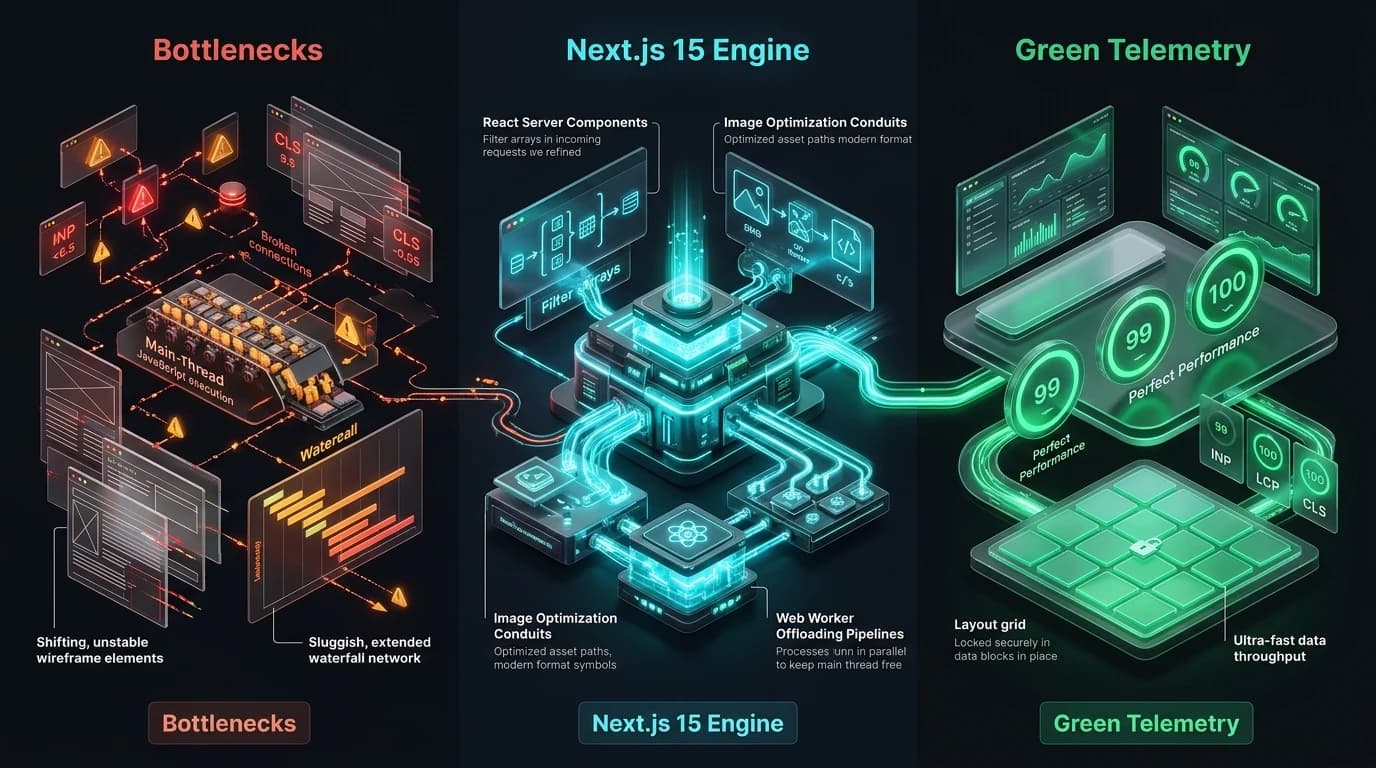
Pillar 1: Conquering INP (Interaction to Next Paint < 50ms)
INP measures user frustration. When a mobile customer taps an "Add to Cart", "Filter by Category", or "Open Navigation" button, how long does the browser take to update the visual UI?
In traditional React SPAs, when an event fires:
- Input Delay: The browser cannot execute the click handler because the main thread is blocked evaluating a 500 KB JavaScript bundle or parsing a third-party tracking pixel.
- Processing Time: The click handler triggers a heavy state update that synchronously re-renders an entire component sub-tree.
- Presentation Delay: The browser recalculates layout and paints pixels to the screen.
The total of these three phases is your INP. If it exceeds 200 milliseconds, Google marks your page as failing.
The 3 Next.js 15 Fixes for Sub-50ms INP:
1. Strip 85% of Client JavaScript with React Server Components (RSC)
By default in the Next.js App Router, every component is a Server Component unless designated with 'use client'. Server Components execute on the server at build or request time, outputting pure HTML and zero client-side JavaScript.
Do not mark an entire page with 'use client'. Keep headers, text blocks, feature matrices, and footers as Server Components. Isolate interactive state strictly into leaf components (such as an <AddToCartButton /> or <ThemeToggle />).
2. Non-Blocking State Updates with useTransition
When an interactive action requires computing or filtering large datasets, wrapping the state transition in React’s useTransition prevents the main thread from locking:
// components/filters/CategoryFilter.tsx
'use client';

import React, { useState, useTransition } from 'react';

interface FilterProps {
  categories: string[];
  onSelect: (category: string) => void;
}

export default function CategoryFilter({ categories, onSelect }: FilterProps) {
  const [activeCategory, setActiveCategory] = useState<string>('All');
  const [isPending, startTransition] = useTransition();

  const handleFilterClick = (category: string) => {
    // 1. Immediately provide visual feedback (Input Delay -> 0ms)
    setActiveCategory(category);

    // 2. Defer heavy data filtering so the main thread yields immediately
    startTransition(() => {
      onSelect(category);
    });
  };

  return (
    <div className="flex gap-2" role="tablist">
      {categories.map((cat) => (
        <button
          key={cat}
          type="button"
          onClick={() => handleFilterClick(cat)}
          className={`rounded-lg px-4 py-2 text-sm font-semibold transition-colors ${
            activeCategory === cat ? 'bg-accent text-surface' : 'bg-surface-2 text-fg hover:bg-surface-3'
          }`}
          aria-selected={activeCategory === cat}
          aria-busy={isPending}
        >
          {cat}
        </button>
      ))}
    </div>
  );
}
Pillar 2: Crushing LCP (Largest Contentful Paint < 650ms)
On 90% of landing pages, the Largest Contentful Paint element is either the primary hero image or the main H1 headline block.
The 3 Common Sins of React LCP:
- Lazy-loading the hero image: Adding
loading="lazy"to a hero image guarantees an LCP disaster. The browser deliberately pauses downloading the image until layout calculations finish. - Serving massive desktop assets to smartphones: Delivering a 3 MB 2560x1440 uncompressed JPEG to a mobile device on a 4G connection takes 3.8 seconds over the air.
- Client-side data waterfalls: Fetching product data inside a
useEffect()hook forces the browser to download the JS bundle, mount the component, execute the API request, and only then start loading the image.
Production Solution: The Bulletproof next/image Hero Pipeline
In Next.js 15, we eliminate LCP waterfalls by pre-rendering the hero markup on the server and using next/image with priority={true} and responsive sizes:
// components/media/HeroImage.tsx
import Image from 'next/image';

interface HeroImageProps {
  src: string;
  alt: string;
  className?: string;
}

export default function HeroImage({ src, alt, className }: HeroImageProps) {
  return (
    <div className={`relative aspect-[16/9] w-full overflow-hidden rounded-2xl bg-surface-2 ${className}`}>
      <Image
        src={src}
        alt={alt}
        fill
        // 1. Priority instructs the browser to preload the image in <head>
        priority={true}
        // 2. Fetchpriority informs browser networking to bump image bytes ahead of scripts
        fetchPriority="high"
        // 3. Responsive sizes ensures mobile devices download 640px assets, not 1920px banners
        sizes="(max-width: 640px) 100vw, (max-width: 1024px) 90vw, 1200px"
        className="object-cover"
        // 4. Quality 85 provides 95% byte reduction with zero visual fidelity loss
        quality={85}
      />
    </div>
  );
}
Pillar 3: Locking CLS to 0.00 (Zero Cumulative Layout Shift)
Cumulative Layout Shift occurs when visible elements suddenly shift position as asynchronous resources (images, web fonts, or banner ads) load into the DOM.
1. Zero-Layout-Shift Font Preloading with next/font
Traditional @import or Google Font <link> tags cause either Flash of Invisible Text (FOIT) or Flash of Unstyled Text (FOUT). When the custom font finishes downloading, glyph widths change, pushing headings and paragraphs down the page.
In Next.js 15, next/font automatically downloads font files at build time, hosts them on your local edge domain, and calculates the exact CSS size-adjust, ascent-override, and descent-override fallbacks so the system fallback font occupies the exact same bounding box:
// app/layout.tsx
import { Plus_Jakarta_Sans, JetBrains_Mono } from 'next/font/google';

const sansFont = Plus_Jakarta_Sans({
  subsets: ['latin'],
  display: 'swap',
  variable: '--font-sans',
  preload: true,
});

const monoFont = JetBrains_Mono({
  subsets: ['latin'],
  display: 'swap',
  variable: '--font-mono',
  preload: true,
});

export default function RootLayout({ children }: { children: React.ReactNode }) {
  return (
    <html lang="en" className={`${sansFont.variable} ${monoFont.variable}`}>
      <body className="font-sans antialiased bg-surface text-fg">{children}</body>
    </html>
  );
}
2. Aspect Ratio Reservation for Dynamic Elements
Always reserve vertical space for dynamic components (such as cookie banners, announcement bars, and third-party embeds) using Tailwind’s aspect-* or explicit min-h-* containers to ensure incoming data never pushes page content down.
Pillar 4: Third-Party Script Offloading via next/script
Third-party marketing scripts (Google Tag Manager, Meta Pixel, Hotjar, HubSpot, Segment) are the #1 cause of Core Web Vitals degradation. A single tracking pixel can inject 250 KB of unoptimized JavaScript that blocks the main thread during initial page load, spiking INP and delaying LCP.
In Next.js 15, we govern third-party scripts using the next/script component:
// components/analytics/AnalyticsScripts.tsx
import Script from 'next/script';

export default function AnalyticsScripts() {
  return (
    <>
      {/* 1. Google Tag Manager: Load on idle to prevent blocking LCP & hydration */}
      <Script
        id="google-tag-manager"
        strategy="lazyOnload"
        dangerouslySetInnerHTML={{
          __html: `
            (function(w,d,s,l,i){w[l]=w[l]||[];w[l].push({'gtm.start':
            new Date().getTime(),event:'gtm.js'});var f=d.getElementsByTagName(s)[0],
            j=d.createElement(s),dl=l!='dataLayer'?'&l='+l:'';j.async=true;j.src=
            'https://www.googletagmanager.com/gtm.js?id='+i+dl;f.parentNode.insertBefore(j,f);
            })(window,document,'script','dataLayer','GTM-XXXXXXX');
          `,
        }}
      />

      {/* 2. Hotjar or Recording tools: Defer strictly after user interaction */}
      <Script
        id="hotjar-snippet"
        strategy="afterInteractive"
        src="https://static.hotjar.com/c/hotjar-123456.js?sv=6"
      />
    </>
  );
}
Are Red Core Web Vitals Hurting Your Organic Rank & ROAS?
We eliminate main-thread bottlenecks, optimize image pipelines, and offload marketing scripts to guarantee green Core Web Vitals across mobile and desktop in 7 business days.
4-Step Operational Checklist to Monitor & Verify CWV
- Test with Mobile CPU Throttling: Lighthouse running on a high-end M3 MacBook does not represent a real mobile user. In Chrome DevTools, open the Performance tab, set CPU throttling to 4x slowdown, and emulate a mid-tier Android phone on Fast 3G.
- Inspect Chrome CrUX Field Data: Lab data (Lighthouse) only captures simulated visits. Inspect your actual field data using Google Search Console's Core Web Vitals report or the
web-vitalslibrary in production telemetry:// app/reportWebVitals.ts import { onINP, onLCP, onCLS } from 'web-vitals'; export function reportWebVitals(metric: any) { console.log(metric.name, metric.value, metric.rating); // Send to analytics endpoint (e.g., Datadog, PostHog, or Vercel Analytics) } - Verify Next.js Image Format Headers: Inspect network responses for hero images to verify they return
content-type: image/aviforimage/webprather than raw uncompressed PNGs. - Audit Long Tasks in DevTools: Ensure no JavaScript execution task exceeds 50 milliseconds during key user flows (opening menus, clicking tabs, or submitting forms).
Frequently Asked Questions
Why did my website's Google Search Console performance fail after the INP update?
In March 2024, Google replaced First Input Delay (FID) with Interaction to Next Paint (INP). FID only measured the time until the browser began executing your code, making unoptimized sites look fast. INP measures the entire time until the visual frame actually paints to the screen. If your React click handlers trigger heavy synchronous re-renders, long tasks lock the browser thread, causing immediate INP failures.
Does using Next.js automatically guarantee passing Core Web Vitals?
No. While Next.js 15 provides premier architectural primitives (React Server Components, edge caching, next/image, next/font), poor developer implementation can easily ruin scores. Common mistakes include placing 'use client' on top-level page components, importing heavy 300 KB charting libraries without dynamic code splitting, and lazy-loading above-the-fold hero banners.
How do third-party analytics and tracking scripts destroy INP and LCP?
Third-party scripts (Google Tag Manager, Meta Pixel, Hotjar, marketing chatbots) execute on the browser's main thread. If they evaluate while the user is loading the page or tapping an interactive element, they delay Largest Contentful Paint and block click handlers, pushing INP well over the 200ms failure threshold. Using next/script with strategy="lazyOnload" prevents them from interrupting user interactions.
How can I test INP and LCP locally before deploying to production?
In Chrome DevTools, navigate to the Performance panel, enable 4x CPU Throttling, and record an interaction flow (e.g., clicking a dropdown or submitting a form). The Performance panel highlights any Long Tasks in red and displays exact interaction delay, processing duration, and presentation delay. For real-world field simulation, deploy a preview build to Vercel and review Chrome CrUX telemetry.
Turn Failing Web Vitals into a Competitive Advantage
Do not let slow JavaScript hurt your search rankings or paid acquisition margins. Talk directly with Abdul Rahman to rebuild your funnel on sub-second Next.js 15 architecture.