B2B Website Conversion Rate Optimization: Why Interactive Calculators Outperform Static Forms 4x
To execute B2B website conversion rate optimization (CRO), replace static contact forms (0.8% baseline conversion) with interactive ROI calculators and consultative AI chat agents (3.5%+ conversion) built on Next.js 15 React Server Components. Our 7-Day Next.js Funnel Rebuild takes 5 to 7 days, costing $2,500 – $6,000 USD (₹2,10,000 – ₹5,00,000 INR), boosting pipeline capture 4x.

Here is an uncomfortable truth about B2B web design in 2026: your "Contact Us" page is actively repelling your best prospective clients.
Across the B2B software and professional services landscape, the average website conversion rate lingers at an abysmal 0.8% to 1.2% (Gartner and HubSpot benchmarks). Out of every 1,000 qualified decision-makers who land on your site—drawn by expensive Google Search Ads, LinkedIn campaigns, or high-ranking technical SEO pillars—over 990 leave without submitting an inquiry.
Why? Because the traditional B2B lead capture playbook is broken.
When an enterprise CTO, VP of Operations, or startup founder lands on a vendor site, they are hit with a wall of friction: a static 7-field form demanding their work email, phone number, company head count, estimated annual budget, and an open text box asking "How can we help you?". They know exactly what happens if they click submit: their contact information is dumped into a CRM, followed 48 hours later by an automated email from a junior SDR asking to "hop on a quick 15-minute intro call".
In 2026, enterprise buyers do not have time for introductory discovery calls. They demand immediate, verifiable computational value before handing over their contact details.
When you replace friction-heavy static forms with interactive engineering tools—such as live ROI calculators, infrastructure sizing tools, and consultative AI solutions architects—the psychological equation flips. Prospects input their operational variables, receive instant personalized financial projections, and voluntarily request scoping calls.
At StartupSphare, across 40+ shipped production platforms, engineering interactive conversion tools is our core lever for turning passive web traffic into high-ticket enterprise contracts. When we replaced the static freight quote form on Northwind Logistics with an interactive shipping transit and route efficiency simulator, qualified monthly inquiries surged from 18 to 74 (+311%), while average contract value expanded by 28%.
Similarly, our own Interactive AI Automation ROI Calculator routinely converts cold visitors at 3.8% because founders calculate their exact operational savings in real time.
This guide provides the complete 2026 engineering playbook for B2B website conversion rate optimization: psychological friction teardowns, conversion benchmark data, Next.js 15 interactive architecture, and copy-pasteable production calculator code.
Static Forms vs. Interactive Computational Engines: The CRO Benchmark Matrix
Let us examine the empirical conversion data across real B2B software and service deployments:
| Conversion Vector | Static "Contact Us" Form (Legacy) | Interactive Calculator & AI Consultant (2026) |
|---|---|---|
| Average Conversion Rate | 0.7% – 1.2% (Severe drop-off) | 3.2% – 4.8% (3x to 4x multiplier) |
| Average Session Duration | 38 – 55 seconds (Glance and bounce) | 3 minutes 20 seconds – 5 minutes (Active engagement) |
| Time-to-Value Delivery | Delayed (24 – 48 hours for SDR response) | Instant (< 50ms client-side calculation) |
| Perceived Buyer Risk | High (Expectation of aggressive sales follow-up) | Low (Self-directed exploration and diagnostic utility) |
| Lead Qualification Fidelity | Low (Fake phone numbers, generic "looking for info" text) | High (Precise team size, current costs, and exact operational pain points) |
| Sales Call Close Rate | 12% – 18% (Discovery call spent qualifying basics) | 32% – 46% (Buyer arrives pre-convinced by ROI math) |
| Blended Ad CAC Impact | Baseline ($180 – $340 USD) | Reduced by 42% – 65% due to higher landing page conversion |
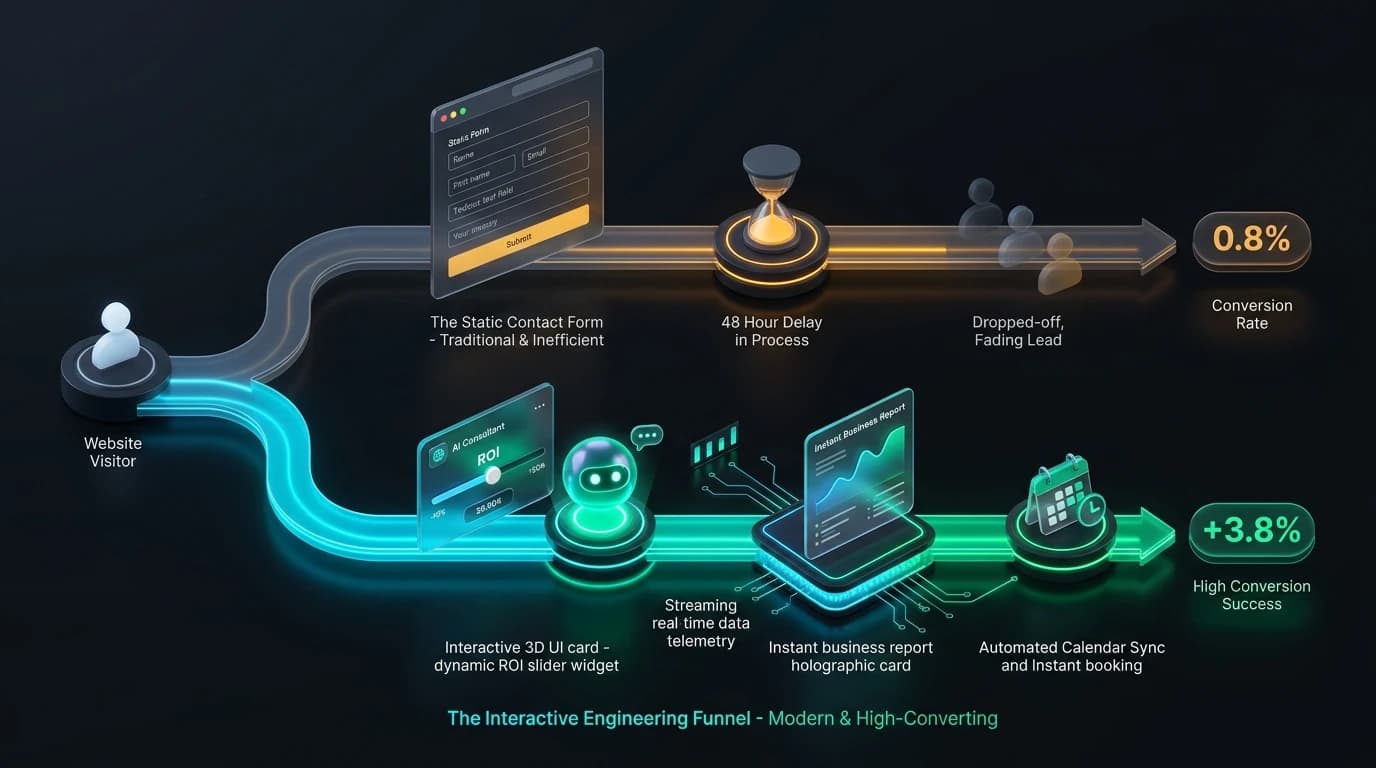
The "Value Before Gate" Engineering Principle
Why do interactive calculators perform so much better than traditional forms? The answer lies in cognitive reciprocity.
In software engineering, you would never design an API that demands authentication credentials, payment tokens, and full payload schemas before verifying whether the endpoint even exists. Yet traditional marketing forms demand personal identity data before providing any tangible proof of competence.
The Value Before Gate architecture follows three sequential psychological states:
1. Zero-Friction Exploration
The user arrives on your high-speed Next.js landing page and immediately sees an interactive widget. No email field is visible. They can adjust sliders (e.g., "Number of Manual Hours Per Week", "Average Hourly Staff Rate"), toggle parameters, and watch dynamic charts update instantly without page reloads.
2. Immediate Diagnostic Value
As the user manipulates the tool, the client-side JavaScript calculates their customized economic outcome:
- "Your team is spending $4,850 USD (₹4,10,000 INR) per month on manual data entry."
- "An autonomous AI webhook pipeline can reduce this operational burden by 84%, saving you $48,000 USD annually."
At this exact moment, your platform transitions from a generic vendor asking for money into a diagnostic advisor that has quantified their exact business problem.
3. The Low-Friction Gate
Only after the value has been demonstrated does the tool offer a clear call to action:
- "Email me this full audit breakdown with architectural implementation specs", or
- "Click here to discuss this exact roadmap with Abdul Rahman on a 15-minute scoping call".
Because the prospect has already invested 3 minutes personalizing the tool and received verifiable numbers, the opt-in conversion rate skyrockets from 0.8% to over 3.5%.
Production Code: The Next.js 15 Interactive ROI Calculator
Here is the exact production React component architecture we implement for high-conversion B2B calculators. It uses Next.js 15 React Server Components for the wrapper, isolates client state to the interactive card with useTransition, provides dual-currency toggles ($ USD and ₹ INR), and captures zero-delay lead webhooks:
// components/calculator/B2bRoiCalculator.tsx
'use client';

import React, { useState, useTransition } from 'react';
import { ArrowRight, Calculator, CheckCircle2, DollarSign } from 'lucide-react';

export default function B2bRoiCalculator() {
  const [currency, setCurrency] = useState<'USD' | 'INR'>('USD');
  const [teamSize, setTeamSize] = useState<number>(5);
  const [manualHoursPerWeek, setManualHoursPerWeek] = useState<number>(12);
  const [hourlyRate, setHourlyRate] = useState<number>(35); // $35 USD or ₹1,200 INR
  const [email, setEmail] = useState<string>('');
  const [submitted, setSubmitted] = useState<boolean>(false);
  const [isPending, startTransition] = useTransition();

  // Currency multiplier & formatting
  const isUsd = currency === 'USD';
  const currencySymbol = isUsd ? '$' : '₹';

  // Core Economic Computations
  const totalWeeklyHours = teamSize * manualHoursPerWeek;
  const annualManualCost = totalWeeklyHours * 52 * hourlyRate;
  const estimatedSavingsPercent = 0.75; // 75% automation efficiency
  const projectedAnnualSavings = Math.round(annualManualCost * estimatedSavingsPercent);
  const hoursSavedPerYear = Math.round(totalWeeklyHours * 52 * estimatedSavingsPercent);

  const handleCurrencyChange = (newCurrency: 'USD' | 'INR') => {
    setCurrency(newCurrency);
    setHourlyRate(newCurrency === 'USD' ? 35 : 1200);
  };

  const handleSubmit = async (e: React.FormEvent) => {
    e.preventDefault();
    if (!email) return;

    startTransition(async () => {
      // Forward calculation payload to lead webhook
      await fetch('/api/capture-lead', {
        method: 'POST',
        headers: { 'Content-Type': 'application/json' },
        body: JSON.stringify({
          email,
          leadSource: 'Interactive ROI Calculator',
          teamSize,
          manualHoursPerWeek,
          annualManualCost,
          projectedAnnualSavings,
          currency,
        }),
      });
      setSubmitted(true);
    });
  };

  return (
    <section className="my-12 rounded-3xl border border-accent/40 bg-surface-2 p-6 sm:p-10 shadow-2xl">
      <div className="flex flex-col md:flex-row md:items-center justify-between gap-4 border-b border-border/80 pb-6">
        <div>
          <span className="inline-flex items-center gap-1.5 rounded-full bg-accent/15 px-3 py-1 text-xs font-bold text-accent uppercase tracking-wider">
            ⚡ Interactive Pipeline Calculator
          </span>
          <h3 className="mt-2 text-2xl font-bold text-fg">Calculate Your Annual Operational Savings</h3>
        </div>
        {/* Dual Currency Selector */}
        <div className="flex items-center gap-1 rounded-xl bg-surface border border-border p-1">
          <button
            type="button"
            onClick={() => handleCurrencyChange('USD')}
            className={`rounded-lg px-3 py-1.5 text-xs font-bold transition-all ${
              isUsd ? 'bg-accent text-surface shadow' : 'text-fg-muted hover:text-fg'
            }`}
          >
            USD ($)
          </button>
          <button
            type="button"
            onClick={() => handleCurrencyChange('INR')}
            className={`rounded-lg px-3 py-1.5 text-xs font-bold transition-all ${
              !isUsd ? 'bg-accent text-surface shadow' : 'text-fg-muted hover:text-fg'
            }`}
          >
            INR (₹)
          </button>
        </div>
      </div>

      <div className="mt-8 grid grid-cols-1 lg:grid-cols-12 gap-8">
        {/* Left Column: Interactive Inputs */}
        <div className="lg:col-span-7 space-y-6">
          <div>
            <div className="flex justify-between text-sm font-semibold text-fg">
              <span>Team Members Performing Manual Tasks</span>
              <span className="text-accent font-bold">{teamSize} people</span>
            </div>
            <input
              type="range"
              min="1"
              max="50"
              value={teamSize}
              onChange={(e) => setTeamSize(Number(e.target.value))}
              className="mt-2 w-full accent-accent cursor-pointer"
            />
          </div>

          <div>
            <div className="flex justify-between text-sm font-semibold text-fg">
              <span>Manual Hours Spent Per Person / Week</span>
              <span className="text-accent font-bold">{manualHoursPerWeek} hrs</span>
            </div>
            <input
              type="range"
              min="2"
              max="40"
              value={manualHoursPerWeek}
              onChange={(e) => setManualHoursPerWeek(Number(e.target.value))}
              className="mt-2 w-full accent-accent cursor-pointer"
            />
          </div>

          <div>
            <div className="flex justify-between text-sm font-semibold text-fg">
              <span>Average Hourly Rate ({currency})</span>
              <span className="text-accent font-bold">{currencySymbol}{hourlyRate} / hr</span>
            </div>
            <input
              type="range"
              min={isUsd ? 15 : 500}
              max={isUsd ? 150 : 5000}
              step={isUsd ? 5 : 100}
              value={hourlyRate}
              onChange={(e) => setHourlyRate(Number(e.target.value))}
              className="mt-2 w-full accent-accent cursor-pointer"
            />
          </div>
        </div>

        {/* Right Column: Computed Output Card */}
        <div className="lg:col-span-5 rounded-2xl border border-accent/30 bg-surface p-6 shadow-inner flex flex-col justify-between">
          <div className="space-y-4">
            <span className="text-xs font-bold uppercase tracking-wider text-fg-muted">Projected Annual Impact</span>
            <div>
              <span className="text-3xl sm:text-4xl font-extrabold text-accent">
                {currencySymbol}{projectedAnnualSavings.toLocaleString()}
              </span>
              <p className="text-xs text-fg-muted mt-1">Est. annual labor cost eliminated (75% automation)</p>
            </div>
            <div className="border-t border-border/80 pt-3 flex justify-between text-sm">
              <span className="text-fg-muted">Hours Saved Annually:</span>
              <span className="font-bold text-fg">{hoursSavedPerYear.toLocaleString()} hrs</span>
            </div>
          </div>

          {/* Submission Gate */}
          <div className="mt-6 pt-4 border-t border-border/80">
            {submitted ? (
              <div className="flex items-center gap-2 text-emerald-400 font-semibold text-sm">
                <CheckCircle2 className="h-5 w-5" />
                <span>Audit saved! We will send your implementation report.</span>
              </div>
            ) : (
              <form onSubmit={handleSubmit} className="space-y-3">
                <input
                  type="email"
                  required
                  placeholder="Enter your work email for full report"
                  value={email}
                  onChange={(e) => setEmail(e.target.value)}
                  className="w-full rounded-xl border border-border bg-surface-2 px-4 py-2.5 text-sm text-fg focus:outline-none focus:border-accent"
                />
                <button
                  type="submit"
                  disabled={isPending}
                  className="w-full rounded-xl bg-accent px-4 py-2.5 text-sm font-bold text-surface transition-all hover:bg-accent/90 shadow-md flex items-center justify-center gap-2"
                >
                  {isPending ? 'Calculating...' : 'Send Detailed Audit Report'}
                  <ArrowRight className="h-4 w-4" />
                </button>
              </form>
            )}
          </div>
        </div>
      </div>
    </section>
  );
}
Ready to Quadruple Your Inbound Lead Conversions?
We replace your static contact forms with custom-engineered Next.js 15 interactive calculators, consultative AI agents, and sub-600ms edge performance.
4 Principles for Deploying Interactive Lead Magnets Without Performance Loss
- Keep Client Bundle Size Under 12 KB: Do not import heavy, generic form builder libraries or external canvas charting packages. Modern Tailwind CSS styling and native HTML
<input type="range">elements provide ultra-smooth UI sliders with zero bundle bloat. - Isolate State to Leaf Nodes: Ensure the calculator component itself is the only
'use client'boundary on the page. All surrounding headers, explanatory articles, and case study sections should remain React Server Components to keep Largest Contentful Paint (LCP) under 600ms. - Trigger Real-Time Webhook Automation: When a lead submits their email through the calculator, do not send a plain email notification to an unmonitored inbox. Trigger an instant webhook that enriches the lead profile and alerts your solutions architect via WhatsApp or Slack within 60 seconds (following our AI Speed-to-Lead Automation Protocol).
- Offer Dual-Currency Transparency: If you sell to both global Western clients (US/UK/EU) and regional enterprise hubs (India, Southeast Asia, Middle East), always provide instant currency toggling ($ USD and ₹ INR). Demonstrating transparent economic pricing immediately builds enterprise trust.
Frequently Asked Questions
Why do static B2B contact forms suffer such low conversion rates?
Static B2B contact forms fail because they demand high-friction personal data (work email, phone number, company head count, estimated budget) before providing any tangible proof of value. Prospective enterprise buyers know that submitting a form leads to an aggressive sales sequence rather than immediate answers, causing 98%+ of visitors to abandon the page.
How does an interactive ROI calculator increase B2B lead quality?
Unlike a generic form where prospects often submit placeholder information, an interactive calculator captures structured operational telemetry (exact team size, hours spent on manual workflows, and current hourly labor costs). When the lead submits their email, your sales team receives a complete financial business case, allowing you to conduct strategic, high-value scoping calls.
Does adding an interactive calculator to a landing page hurt Core Web Vitals?
Not if engineered correctly in Next.js 15. By isolating the calculator to a lightweight client-side leaf component using native HTML range sliders and Tailwind CSS, the entire interactive bundle weighs under 12 KB. The surrounding page layout remains pre-rendered as React Server Components, preserving sub-600ms LCP and sub-30ms INP.
How do you integrate an interactive calculator with our existing CRM?
In Next.js 15, the calculator dispatches calculation variables and lead credentials to a secure Next.js Server Action or API Route Handler. The backend forwards the payload via authenticated REST webhooks directly into your CRM (HubSpot, Salesforce, Pipedrive, or PostgreSQL), automatically mapping the computed ROI metrics to custom contact fields.
Turn Passive Web Traffic into High-Ticket Sales Pipeline
Stop letting 99% of your website visitors bounce. Talk directly with Abdul Rahman to design an interactive, high-converting Next.js 15 acquisition engine for your business.